

ChatGPT
How to Connect ChatGPT to Your Family Calendar, Lists, Notes, Contacts, and Recipes

Giving ChatGPT a useful place to help with the rest of your day might sound like a technical project. With ComingUp Today, it only takes a few minutes.
Install ComingUp Today from ChatGPT, connect your account, choose what you want ChatGPT to be able to access, and then return to an ordinary conversation. There are no special commands to learn and no need to configure a manual connection.
Once connected, you can ask ChatGPT to help with the calendar, events, lists, notes, contacts, and recipes your household uses in ComingUp Today.
Set It Up in a Few Minutes
Start with the official ComingUp Today listing in ChatGPT.
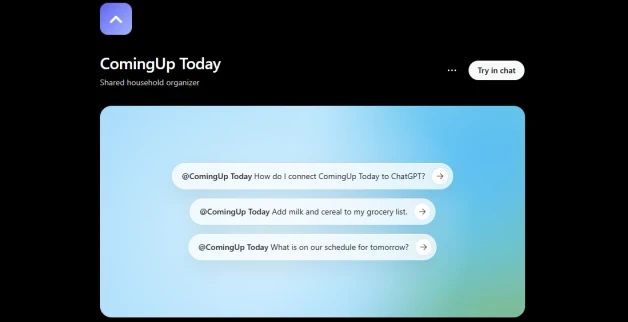
Find ComingUp Today in ChatGPT and open the public listing to begin.
From there:
- Install ComingUp Today.
- Connect your ComingUp Today account.
- Review the requested permissions and choose what you want ChatGPT to be able to view or change.
- Return to a normal ChatGPT conversation and ask for what you need.
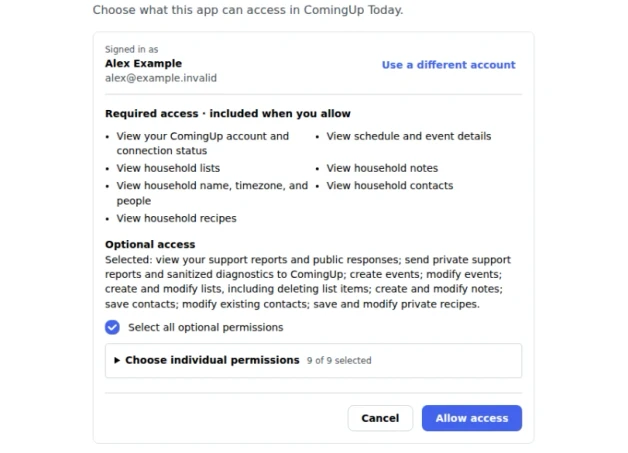
Review the requested access and choose which optional actions you want ChatGPT to perform through ComingUp Today.
That is the entire basic setup. You do not need to understand MCP, enter an endpoint, or learn a command syntax.
For additional setup help, visit the ComingUp Today and ChatGPT integration guide.
Ask in the Same Way You Would Ask a Person
The useful part is not having another application to operate. It is being able to describe what you want in ordinary language while ChatGPT helps put the information where it belongs.
You might say:
“What do we have going on tomorrow?”
“Add soccer practice Thursday at 5 p.m.”
“Add milk, apples, and sandwich bags to my shopping list.”
“Save these instructions as a household note.”
“Save this electrician using the contact details I provided.”
“Help me finish this recipe, then save it to ComingUp.”
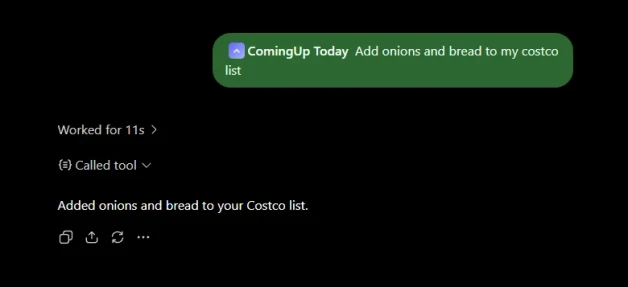
An ordinary ChatGPT request adds onions and bread to the shared Costco list in ComingUp Today.
ChatGPT can work with the details already present in the conversation. If you have been discussing an event, refining a recipe, or collecting information for a note, you do not have to stop and manually copy every field into another screen.
You can ask the assistant to save the useful result to ComingUp Today.
Less Data Entry, Without Losing the Organized Result
Forms still have their place, but they are not always the easiest way to capture something.
An event may begin as a sentence, a flyer, or a conversation. A shopping list grows one forgotten item at a time. A useful note may come out of several minutes of planning. A recipe may change repeatedly before it becomes the version you actually want to make.
ChatGPT can help interpret that information and ask follow-up questions when something important is unclear. ComingUp Today gives the finished result an organized place to live.
That combination means less retyping and fewer interruptions between noticing something and putting it where your household can use it.
If you want more examples of how this works throughout an ordinary day, read When AI Can Help With the Rest of Your Day. It looks more closely at turning dinner ideas, event flyers, project plans, and everyday needs into recipes, events, and shopping lists that remain useful after the conversation.
One Household Does Not Mean One Person Has to Enter Everything
ComingUp Today is built for shared household coordination.
Different household members can have their own ComingUp Today accounts and their own ChatGPT accounts. Each person can connect separately and approve the access that makes sense for that connection.
That means one person can add an event while making plans in ChatGPT. Someone else can add groceries when they notice something is running low. Another household member can save a contact, update a note, or preserve a recipe they worked through with the assistant.
When the information is saved to a shared area in ComingUp Today, the household members who already have access can see the same updated information. Nobody has to share a ChatGPT password or a ComingUp Today login, and one person does not have to become the household’s permanent data-entry operator.
ChatGPT becomes another convenient way for each person to contribute. ComingUp Today remains the shared place where the household sees and uses the result.
A Quick Note About Access
Each person connects with their own ComingUp Today account, and ChatGPT can only use the household information that account is already allowed to access. Viewing and changing information are separately permissioned. You can choose what to approve and change or remove the connection later.
The important part is straightforward: connecting ChatGPT does not require sharing accounts or giving every person the same access.
Start With One Ordinary Request
After connecting, try something small.
Ask ChatGPT to check tomorrow’s plans. Add one item to a shared list. Save a useful note from the conversation. If ChatGPT does not select ComingUp Today automatically, tell it to use ComingUp.
Once you see the result appear where your household expects it, the value becomes clear. You can keep using ChatGPT as a conversational assistant while ComingUp Today keeps the calendar, lists, notes, contacts, and recipes organized for the people who need them.
Install ComingUp Today in ChatGPT and try your first request.